

"Got a last-minute board deck request with a mountain of raw data? See how AutoPresent transforms chaotic emails, Excel sheets, and PDFs into a structured, fully editable strategic roadmap in minutes. #Productivity #GenerativeAI #ManagementConsulting #CorporateStrategy"
In corporate strategy, management consulting, and venture capital, few scenarios induce more anxiety than the last-minute board deck request.
Imagine it is 9:14 AM. Your managing partner emails you a chaotic mix of raw diligence notes, a financial model, and a brief outline of what the board needs to see by your 4:00 PM sync. The board meeting is tomorrow morning. To deliver, you have to parse complex market data, synthesize a 24-month strategic roadmap, build structured frameworks like a 2x2 prioritization matrix, and format everything into a cohesive, executive-ready slide deck.
Traditionally, this process takes days of manual synthesis and design iterations. With AutoPresent, you can transform this multi-day grind into a streamlined, minutes-long workflow.
This article walks through the exact "email-to-deck" workflow, demonstrating how AutoPresent converts raw, unstructured files into a polished, fully editable board presentation.
The Challenge: The High-Stakes, Low-Time Presentation Grind
When a senior leader or partner asks for a "value-creation roadmap" based on raw diligence, the challenge isn't just making the slides look pretty. The real challenge is synthesis.
As shown in the workflow video, a typical request arrives with:
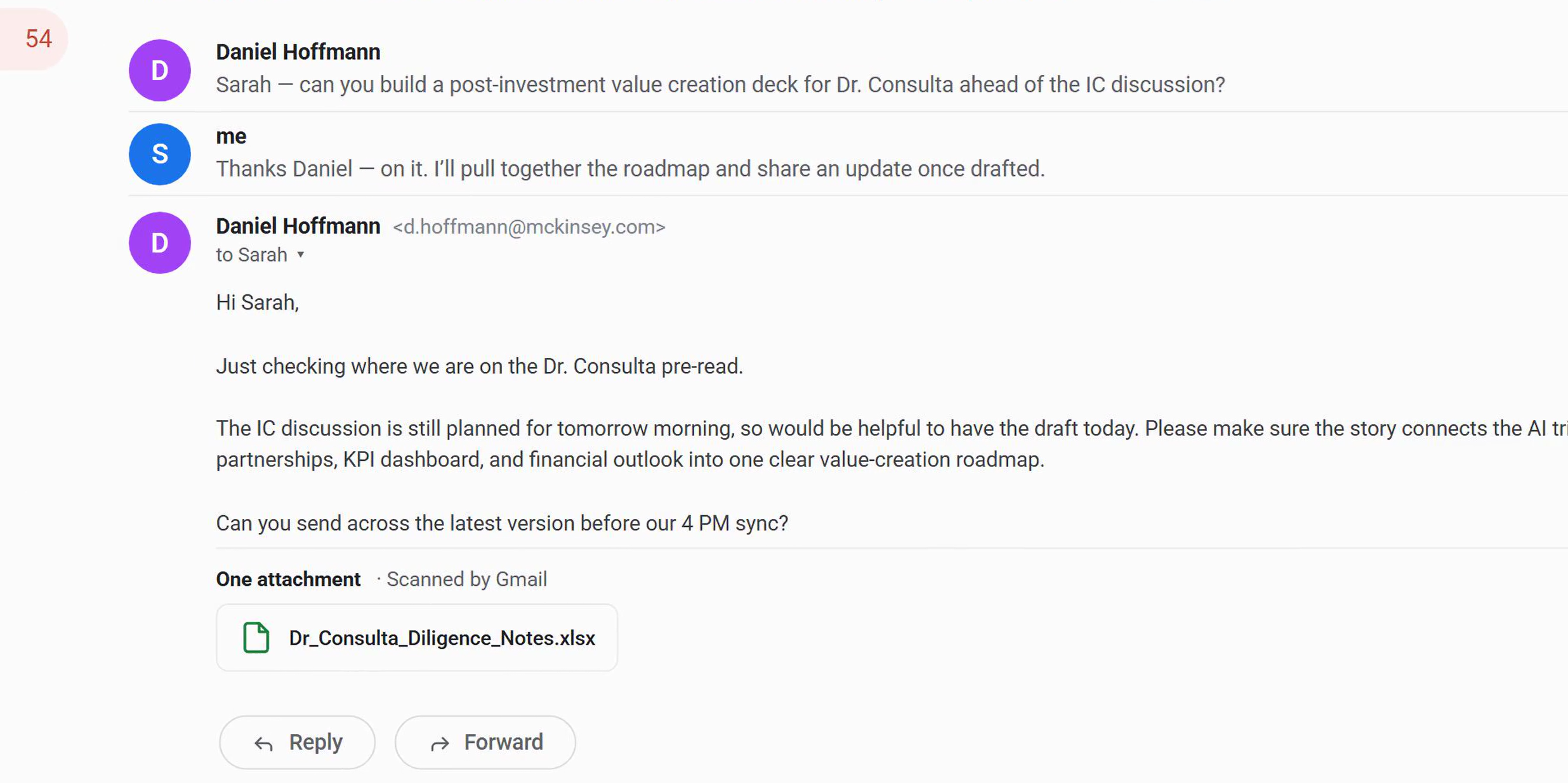
- An email outlining key narrative threads (e.g., connecting AI triage rollouts, telemedicine, B2B subscriptions, and financial outlooks).
- An unstructured Excel sheet (
Dr_Consulta_Diligence_Notes.xlsx). - A PDF of market diligence (
dr_consulta_market_diligence.pdf). - An existing high-level summary presentation (
phase-1-dd-summary.pptx). - Unformatted interview notes (
management-interview-notes.docx). - A network map image (
clinic-network-map.jpg).
Manually reading these documents, extracting the core insights, structuring them into logical business frameworks, and aligning them to a professional brand template takes hours of focused, tedious labor.
The Workflow: From Raw Inputs to Board-Ready Slides
AutoPresent automates the heavy lifting of narrative synthesis and slide design. Here is how the step-by-step process works:
Step 1: Define the Prompt and Context
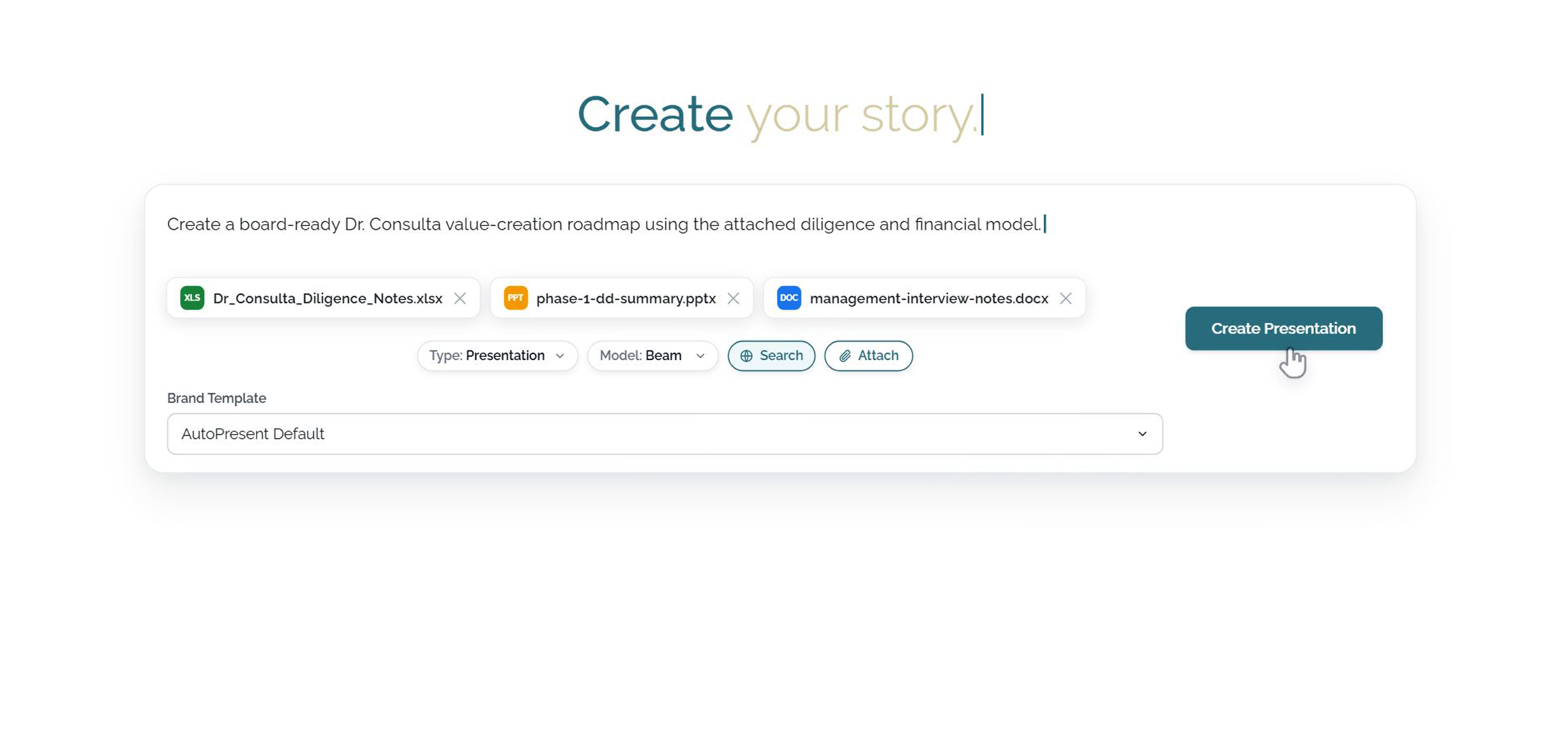
In the AutoPresent interface, you start by typing a clear, goal-oriented prompt. In this scenario, the prompt is:
"Create a board-ready Dr. Consulta value-creation roadmap using the attached diligence and financial model."
Step 2: Attach the Source Material
Instead of copy-pasting text or manually summarizing data, you upload your raw source files directly to the prompt. AutoPresent supports a wide range of formats, allowing you to attach:
- Spreadsheets (Excel/CSV)
- Documents (Word/PDF)
- Existing presentations (PowerPoint)
- Images and diagrams (JPG/PNG)
Step 3: Select Your Brand Template
To ensure the output aligns with your corporate guidelines, select your preferred brand template. AutoPresent applies your pre-configured typography, color palettes, and grid systems automatically.
Step 4: Generate the Presentation
Click Create Presentation. AutoPresent’s AI engine reads the files, extracts the key strategic themes, builds a logical narrative arc, and designs structured slides that represent the data visually.
Analyzing the Output: Professional Business Frameworks
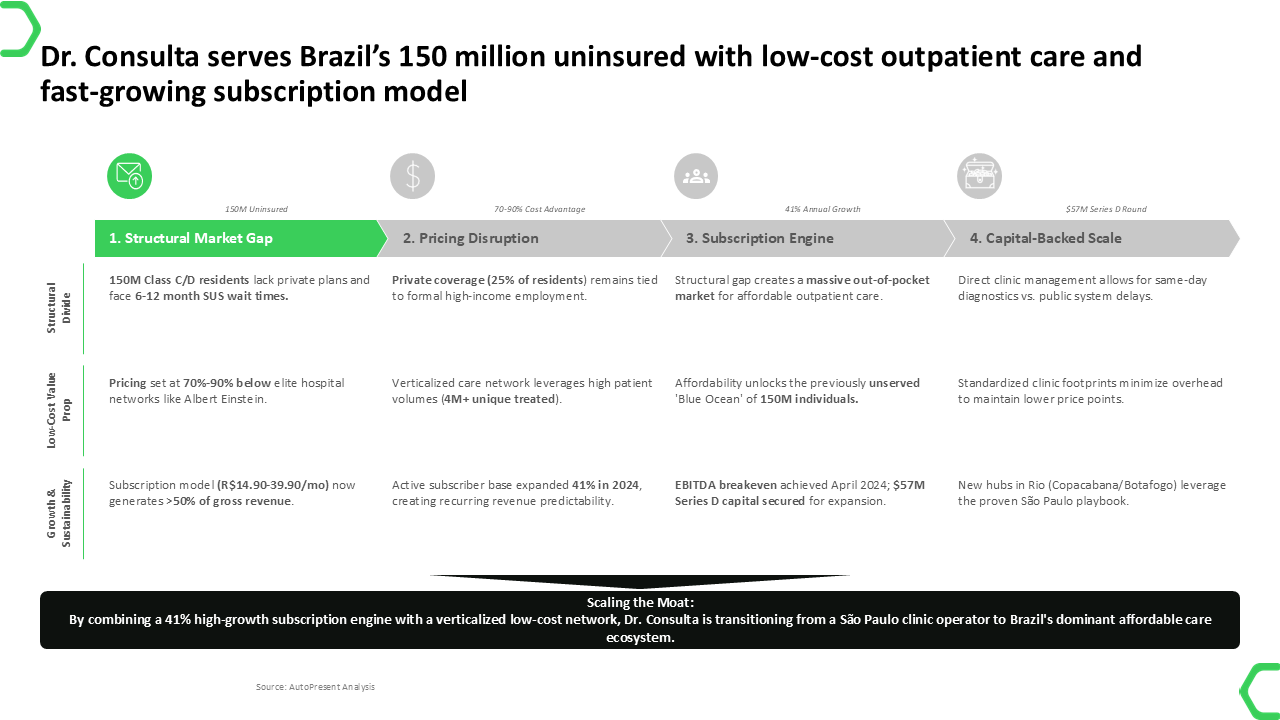
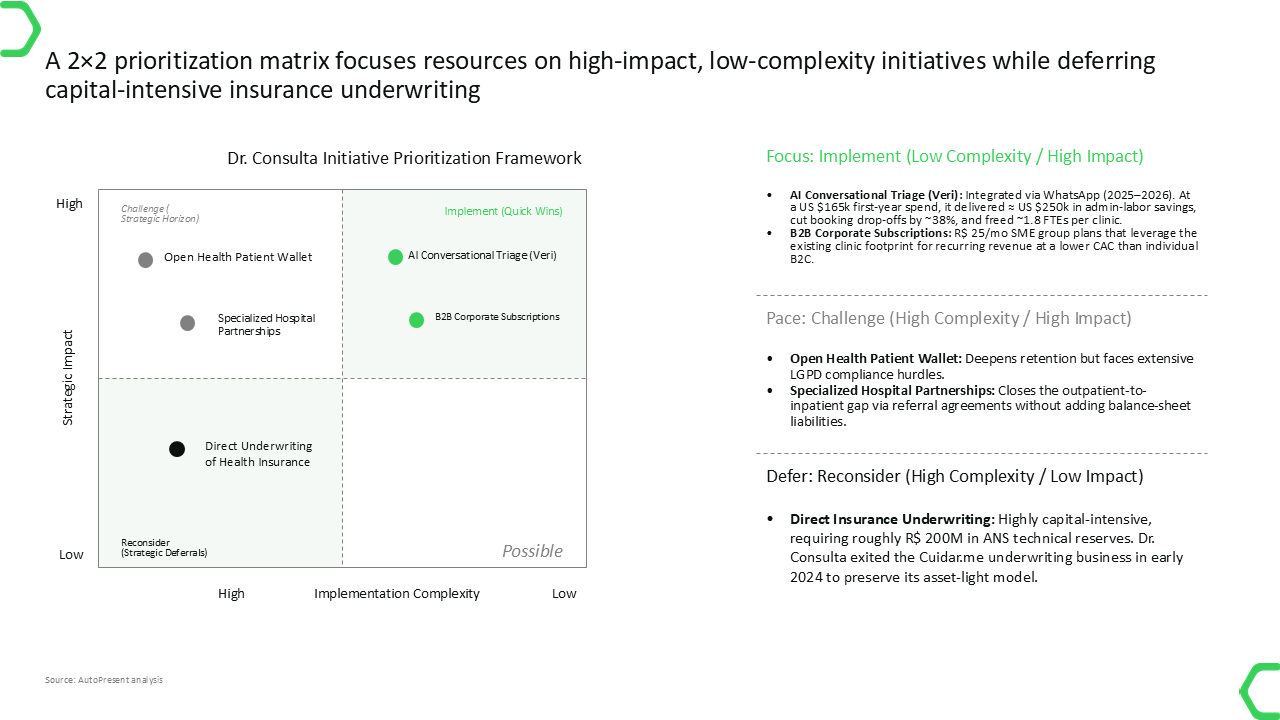
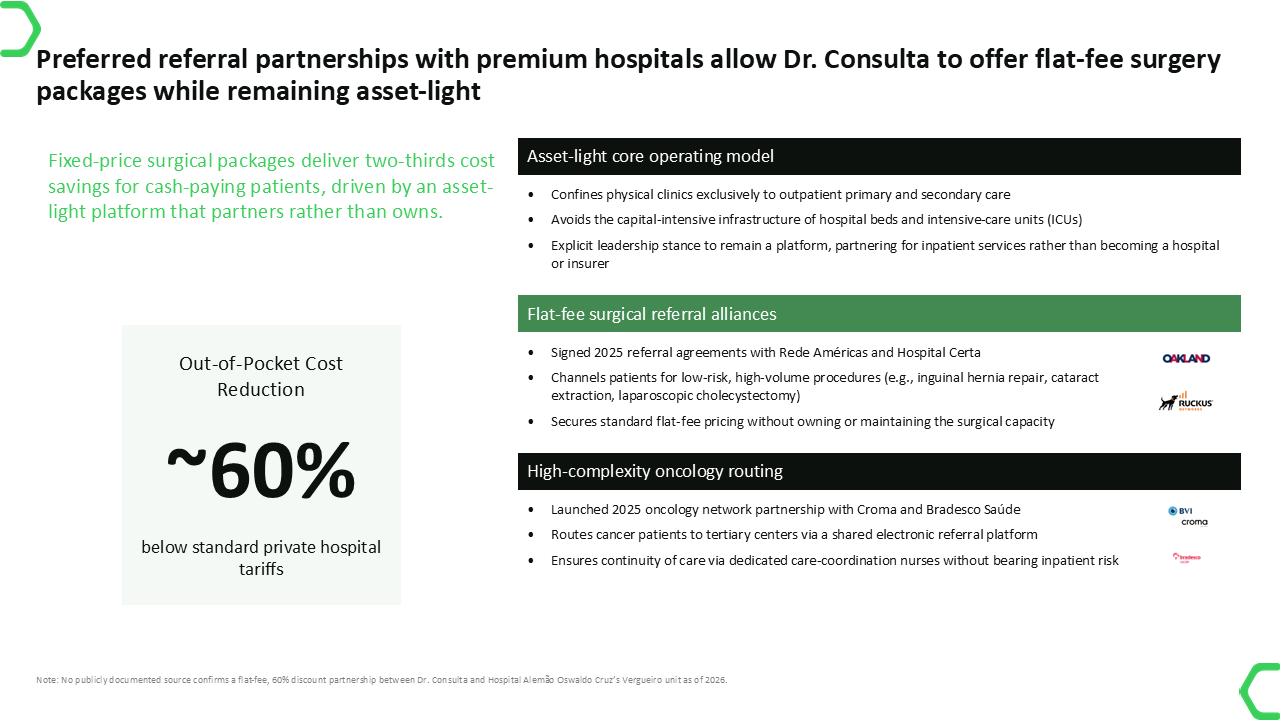
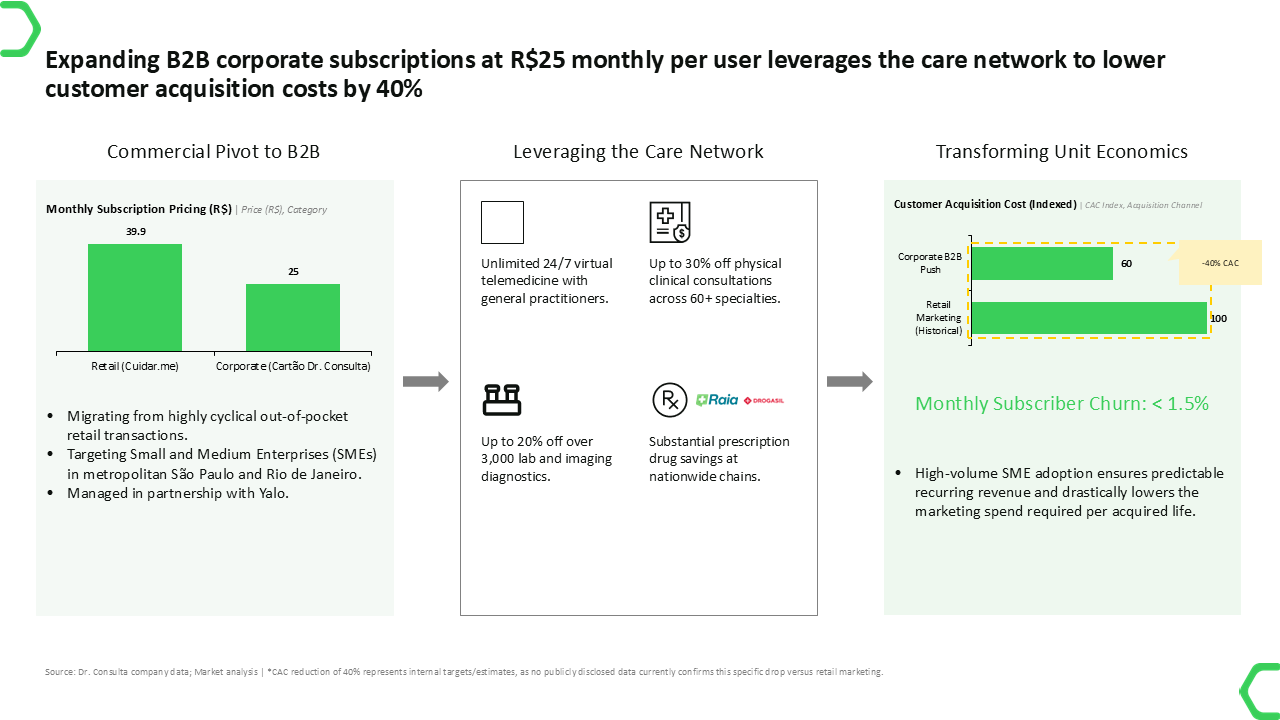
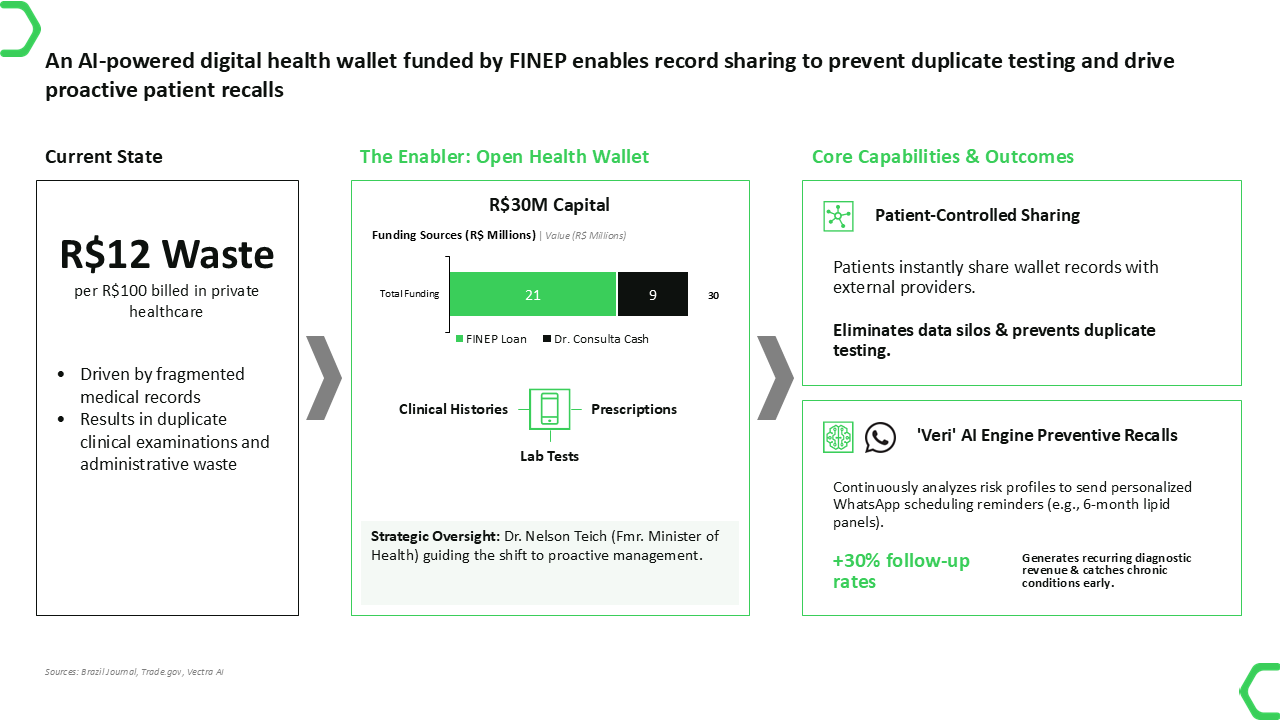
Rather than generating generic templates with placeholder text, AutoPresent outputs highly contextual, data-rich slides tailored to your specific business case. In the demonstrated Dr. Consulta example, the generated deck includes:
- A Clear Title & Strategic Framing: A professional cover slide outlining the 24-month strategic plan, complete with subtitle context and metadata.
- Market Context & Value Proposition: A structured slide detailing how the company addresses the target market (e.g., Brazil's uninsured population) with key metrics highlighted.
- A 2x2 Prioritization Matrix: A visually balanced grid mapping initiatives by strategic weight (high vs. low impact) and implementation complexity (high vs. low complexity).
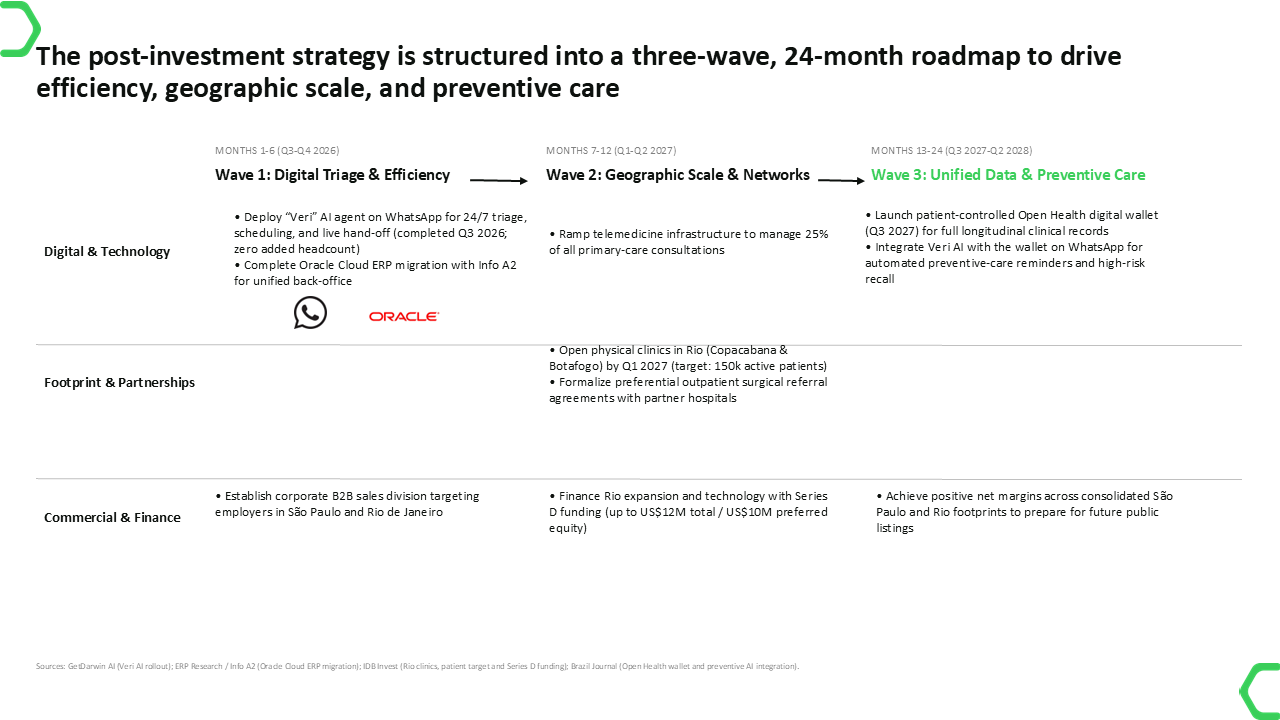
- A Multi-Wave Roadmap: A horizontal 24-month timeline divided into distinct operational phases (e.g., Digital & Technology, Footprint & Partnerships, Commercial & Finance).
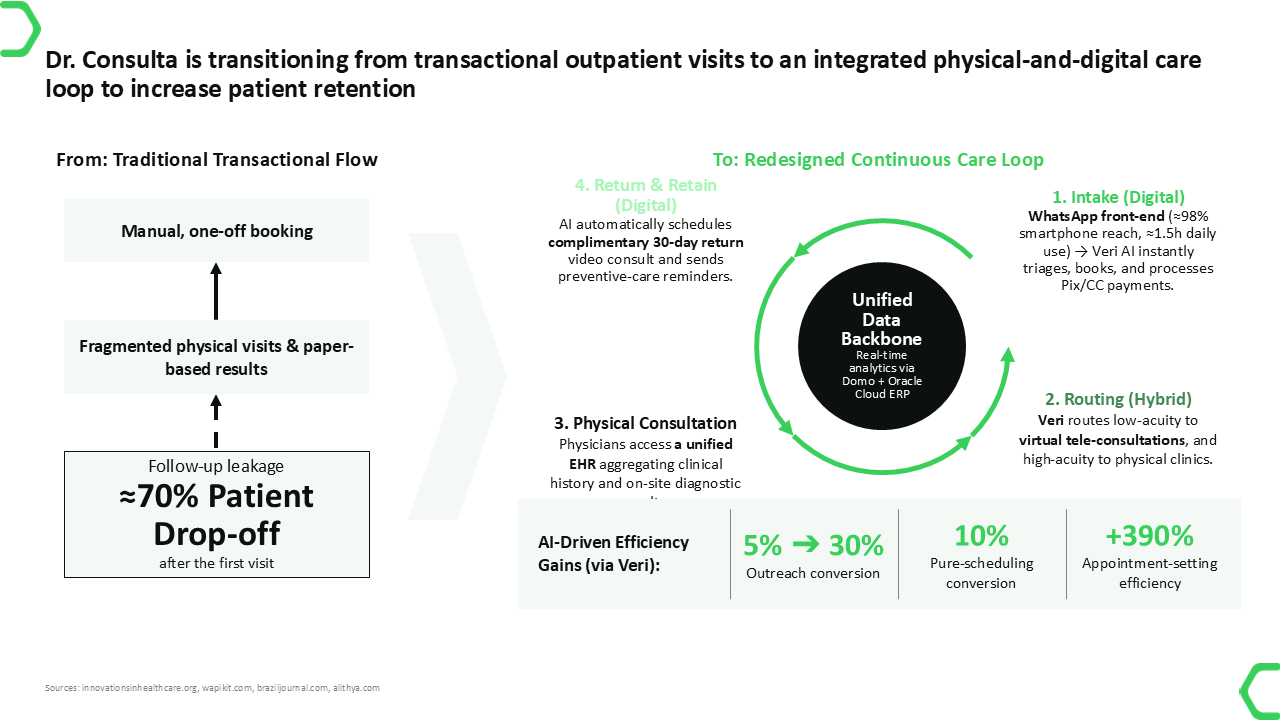
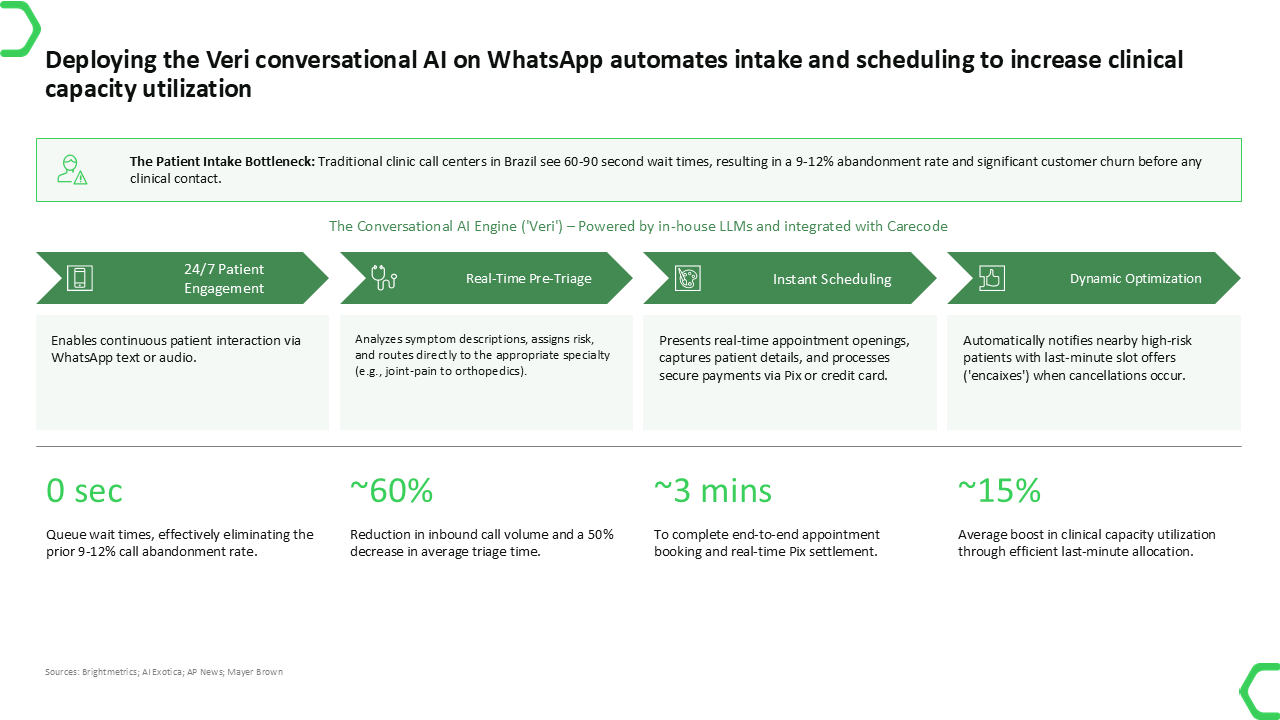
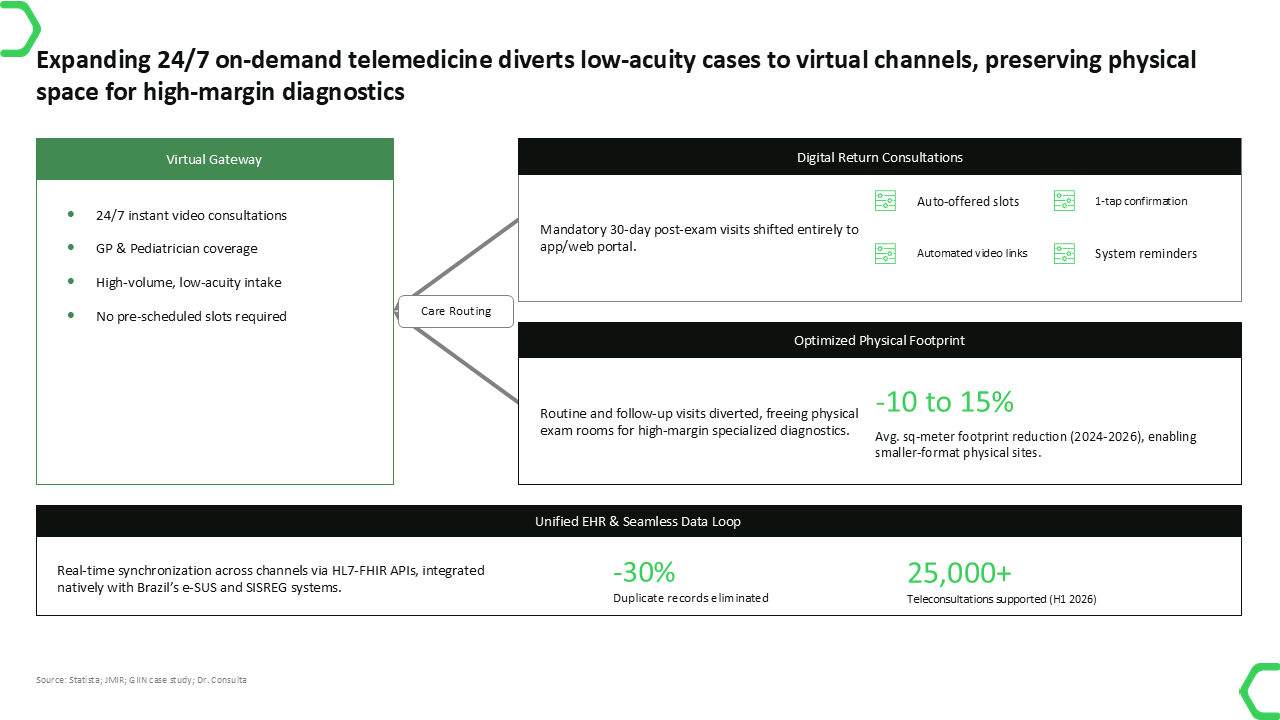
- Operational Deep Dives: Dedicated slides analyzing specific initiatives, such as conversational AI triage on WhatsApp and 24/7 on-demand telemedicine, complete with visual metrics and process flows.
- A KPI & Financial Dashboard: A clean, tabular view comparing baseline metrics against future targets, complete with strategic rationales.
The finished presentation can be reviewed as a continuous deck preview. Scroll through the generated slides below to see how the raw email and diligence package become a structured board narrative.

The Power of True Editability
A common frustration with AI slide generators is that they often output flat, unchangeable images or rigid layouts.
AutoPresent is built for professional workflows. The generated slides are fully editable. Once the presentation is created, you can open it to:
- Refine the Text: Edit headers, bullet points, and data labels to match your exact phrasing.
- Adjust Layouts and Shapes: Move, resize, or recolor shapes, tables, and matrix grids.
- Update Data: Modify the numbers in generated tables or charts as new financial models emerge.
- Maintain Brand Consistency: Easily swap themes or adjust alignment without breaking the underlying slide structure.
This ensures that the AI does the heavy lifting of drafting and structuring, while you retain absolute control over the final polish.
Key Benefits of AutoPresent for Corporate Teams
- Massive Time Savings: Skip the blank-page phase. Go from raw email attachments to a comprehensive first draft in minutes.
- Automatic Synthesis: AutoPresent connects the dots between disparate sources—like matching an Excel financial model with qualitative interview notes—to build a unified narrative.
- Executive-Ready Design: No more wrestling with text box alignment, overlapping shapes, or inconsistent margins. Every slide is generated using clean, professional design principles.
- Framework-Driven Layouts: Instead of standard bulleted lists, AutoPresent automatically structures information into matrices, timelines, and comparison tables.
Ideal Use Cases
- Management Consultants: Quickly turn client interview notes and financial models into structured steering committee (SteerCo) decks.
- Corporate Strategy Teams: Synthesize market research, internal operational data, and executive briefs into unified strategic roadmaps.
- Investment Analysts & VCs: Convert diligence folders and portfolio company metrics into clean investment committee pre-reads.
- Startup Founders: Transform raw financial projections and product roadmaps into polished investor pitch decks.
Frequently Asked Questions (FAQ)
What file formats can I upload to AutoPresent?
AutoPresent supports a wide variety of business documents, including Excel spreadsheets (.xlsx), Word documents (.docx), PDFs, PowerPoint files (.pptx), and images (.jpg, .png).
Are the generated slides editable in PowerPoint?
Yes. AutoPresent generates structured, native slide elements. You can edit text boxes, adjust shapes, modify tables, and rearrange layouts just as you would with a manually created PowerPoint presentation.
Can I use my company's custom brand templates?
Absolutely. AutoPresent allows you to upload and apply custom brand templates, ensuring that every generated deck automatically adheres to your organization's specific colors, fonts, and styling guidelines.